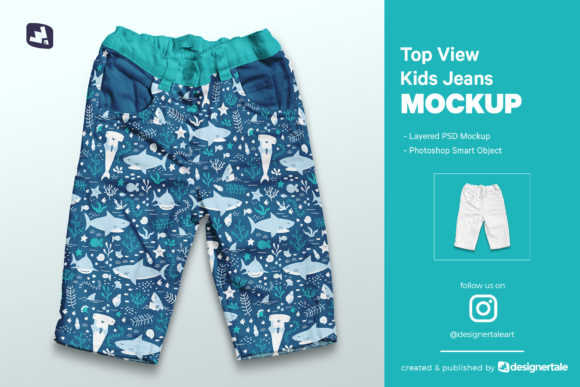
Top View Kid’s Jeans Mockup
Kid’s jeans or pants are the cutest — and when you’re designing for babies and toddlers, visual clarity matters just as much as charm. The Top View Kid’s Jeans Mockup gives you a clean, professional way to showcase patterns, prints, and fabric concepts from directly above — no photography setup, studio time, or model coordination required. It’s built for creators who need speed without sacrificing realism: think indie apparel designers launching a new organic cotton line, boutique owners updating seasonal lookbooks, or print-on-demand sellers preparing Amazon or Etsy listings.
Why a top-down angle works so well for baby clothing
A top view eliminates distortion, highlights seam placement, waistband structure, and pocket symmetry — details that parents notice instantly. Unlike front-facing mockups that obscure fit or side views that hide key construction points, this perspective shows how a pattern flows across the full garment surface. That’s especially useful when presenting all-over prints (like tiny stars, woodland animals, or watercolor florals) or coordinating sets (matching joggers + onesies). You’ll see exactly how repeats align at the crotch seam or how contrast stitching wraps around the back yoke — things hard to replicate in flat sketches or low-res renders.
Realistic texture and smart editing — not just another PSD
This isn’t a generic layered template with flat shadows and synthetic folds. The Top View Kid’s Jeans Mockup includes subtle denim grain, soft creasing along the thighs, and natural light diffusion over curved surfaces — all baked into high-fidelity 300dpi layers. At 6000 × 4000 pixels, it scales cleanly for print catalogs, social ads, and website banners. More importantly, every editable element lives inside clearly labeled Smart Objects: fabric color, pattern overlay, stitching tone, even background lighting intensity. Change one swatch, and the entire denim surface updates cohesively — no manual layer-by-layer recoloring.
Organized layers mean you won’t waste minutes hunting for “left-leg-shadow” or “waistband-reflection.” Everything follows logical naming: Base Fabric, Pattern Insert, Stitching Highlights, Shadow Cast. That structure helps freelancers hand off files to clients or collaborators without lengthy explanations — and makes revisions faster whether you’re adjusting saturation for a pastel collection or testing contrast for accessibility compliance.
Who benefits most — and how
Small-batch designers use this mockup to validate pattern scale before cutting fabric. A 2-inch floral repeat might look balanced on screen but overwhelm tiny legs — seeing it life-size in the mockup catches that early. Educators and students in fashion design courses apply textile theory directly: swapping out weave simulations (twill vs. stretch denim), experimenting with eco-dye effects, or comparing wash treatments (stone-washed vs. enzyme-finished) using the same base file. Bloggers and influencers creating “behind-the-scenes” content embed the mockup alongside real photos — giving followers a clearer sense of how digital designs translate to physical garments.
Even marketers building email campaigns report stronger engagement: baby clothing visuals with consistent top-down framing perform better in A/B tests than mixed-angle galleries. Why? Parents scan quickly. A uniform perspective builds visual trust — they know what to expect across product variants without reorienting mentally.
What’s included — and what’s not
You get one fully layered PSD file, a detailed guide video walking through each Smart Object workflow, and technical specs optimized for both screen and print output. The mockup supports unlimited color changes — swap indigo for charcoal, ecru for sage, or even test metallic thread accents — all non-destructively. But note: the sample patterns shown in preview images aren’t included. That’s intentional. It keeps your design process flexible: import your own Illustrator vector repeats, Procreate brush textures, or scanned hand-drawn motifs without licensing conflicts or style mismatches.
When to consider alternatives
If your work focuses heavily on motion, drape, or full-body styling (e.g., showing how jeans sit with a romper or interact with shoes), a 3/4 angle or lifestyle mockup adds complementary context. Likewise, if you regularly present multiple sizes (0–3M, 3–6M, 6–12M), you’ll want to verify how scaling affects pattern alignment — this version is sized for standard 6–12M proportions. Always test your final export at actual print dimensions; while 300dpi ensures crispness, ultra-fine details (like micro-embroidery lines under 0.5pt) may soften slightly depending on printer calibration.
Time saved isn’t just minutes — it’s creative momentum
One user — a freelance textile designer launching a sustainable babywear line — cut her presentation prep from 3 days to under 90 minutes per style. She used the guide video to master Smart Object nesting in under 20 minutes, then batch-updated colors across 12 SKUs using layer comps. Another small business owner replaced three separate stock photo subscriptions with this single mockup, citing better brand consistency and faster response times to wholesale buyer requests.
That efficiency compounds. When you’re not troubleshooting layer masks or resizing mismatched templates, you’re refining stitch density, adjusting print opacity for softer contrast, or iterating on pocket shape — decisions that impact wearability and parent appeal. The Top View Kid’s Jeans Mockup doesn’t replace craftsmanship; it protects the time needed for it.
A practical note on usage rights
This is a commercial-use mockup: you can display your designs in portfolios, client decks, online stores, and printed materials — no attribution required. However, reselling or redistributing the PSD file itself, or claiming the mockup as your original creation, isn’t permitted. Always check license terms if bundling with third-party assets (e.g., fonts or icon sets).
Final thought: Clarity invites connection
Baby clothing isn’t just about function — it’s about emotion, care, and intention. A well-presented design communicates that before a single stitch is sewn. The Top View Kid’s Jeans Mockup delivers that clarity: precise, adaptable, and grounded in how real garments behave. It won’t replace hands-on sampling, but it sharpens your early decisions — helping you launch with confidence, iterate with purpose, and speak directly to the people who matter most: parents choosing thoughtfully, and children wearing joyfully.